Choosing the best image format is no longer a purely technical decision. Today, images are used across websites, design workflows, social platforms, digital products, and print materials — and each context places different demands on quality, file size, compatibility, and output requirements.
There is no single image format that works best in every situation. A format that performs perfectly for photography may fail when used for logos, while a format optimized for printing can be unnecessarily large for digital use. The right choice depends on how an image will ultimately be displayed, edited, shared, or reproduced.
This guide explains how modern image formats differ and how to choose the best format based on real-world use cases.
Why Image Format Choice Matters
Image formats determine far more than how a picture looks. They influence how efficiently visual information is stored, transmitted, edited, and reproduced across different environments.
When exporting or saving an image, the selected format affects several practical outcomes. Some formats discard visual data to reduce file size, while others preserve every pixel exactly as created — a difference that becomes noticeable when images are edited repeatedly, resized, or printed. Compression also affects delivery: smaller files load faster and transfer more easily, while larger files can preserve more detail.
Finally, the destination matters. An image prepared for a website, a mobile app, or high-resolution printing is rarely optimized the same way. Choosing a format based on the final use helps avoid either unnecessary quality loss or oversized files.
Most Used Image Formats in 2026 (Real-World Adoption)
Despite the emergence of newer image formats, a small group of established formats continues to dominate real-world usage across websites and digital platforms.
According to W3Techs image format usage statistics, the most commonly used image formats on websites in 2026 are:
- PNG — used on about 77% of websites
- JPEG — used on about 72% of websites
- SVG — used on about 65% of websites
- WebP — used on roughly 19% of websites
- GIF — used on around 15% of websites
- AVIF — used on just over 1% of websites
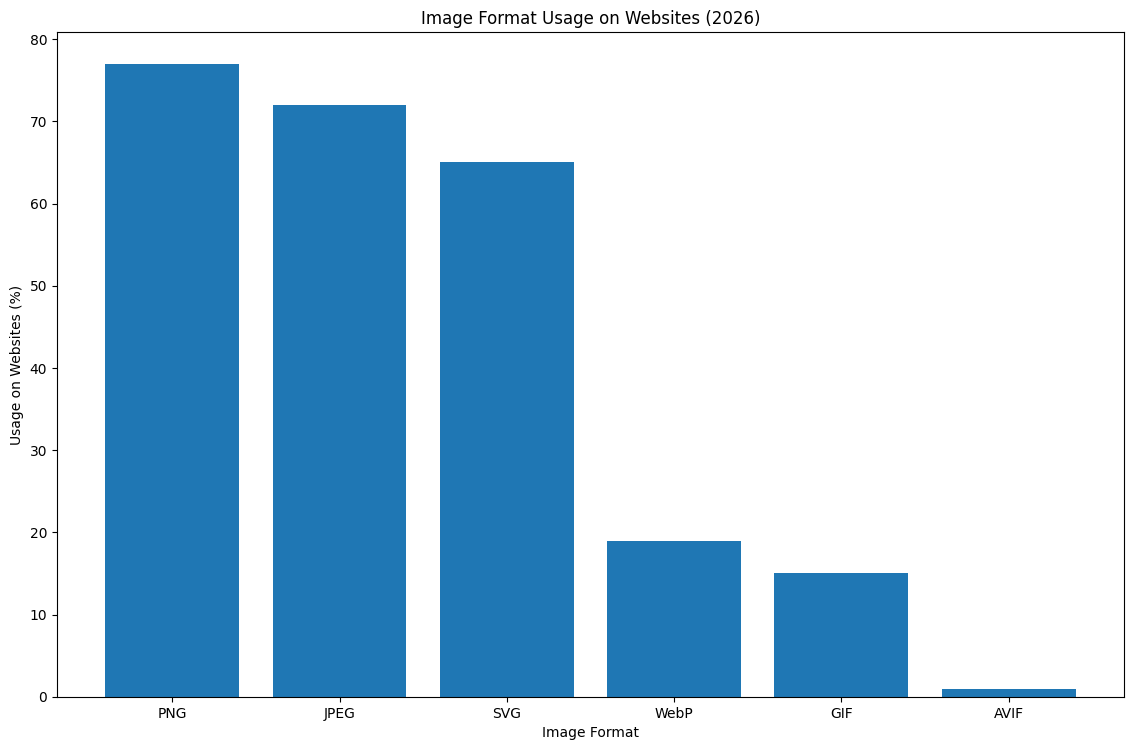
These percentages indicate how many websites use a particular format somewhere on the site. Because most websites rely on multiple image types simultaneously, total usage exceeds 100%.
How Image Formats Differ
Raster vs. Vector Images
Image formats fall into two fundamental categories.
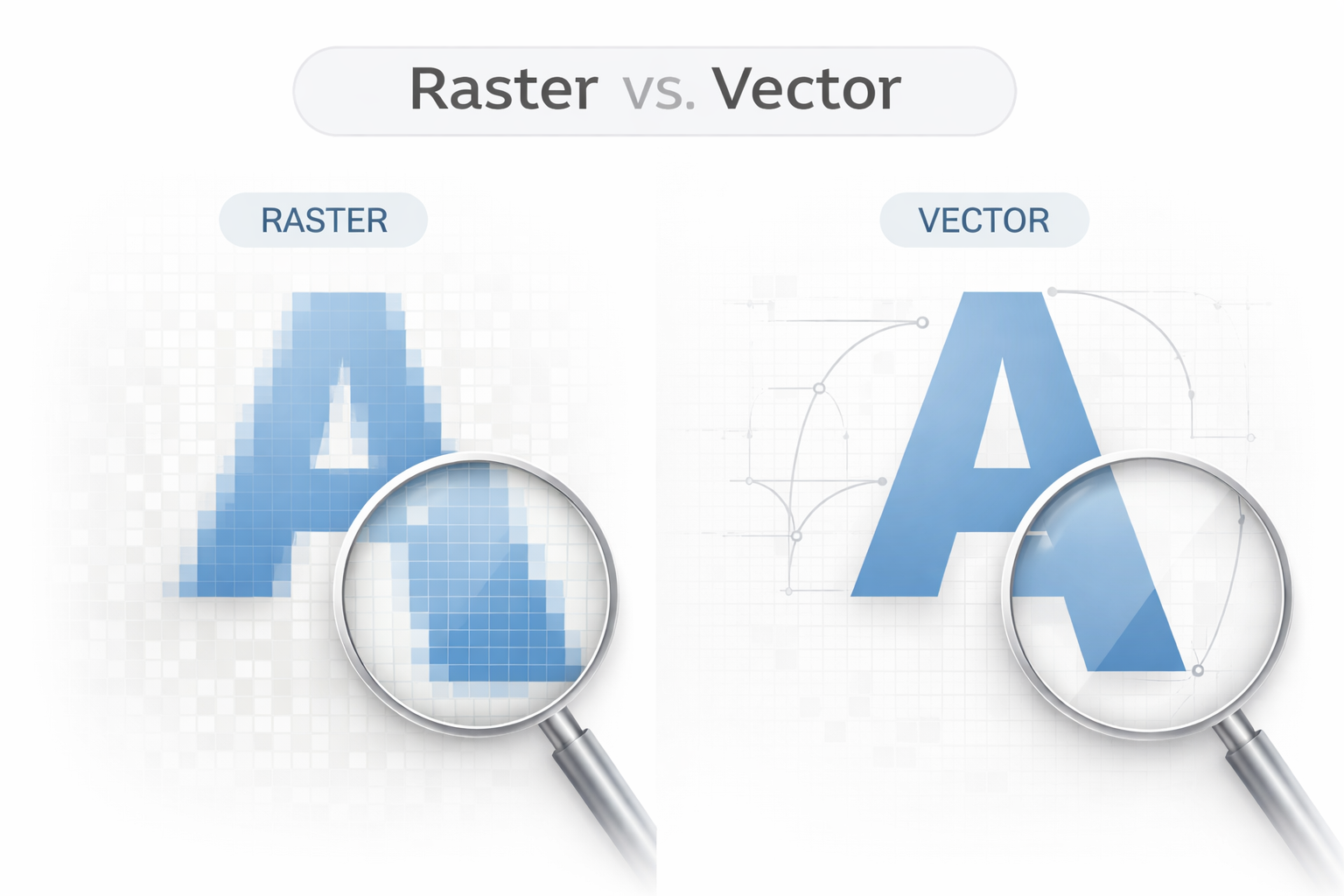
Raster images are built from pixels arranged in a fixed grid. Formats such as JPEG, PNG, WebP, AVIF, and GIF belong to this group. Because raster images store color information for every pixel, they are ideal for photographs and detailed visuals. However, enlarging them beyond their original resolution leads to visible pixelation.
Vector images, such as SVG, store images using mathematical paths instead of pixels. This allows them to scale infinitely without losing sharpness, making them perfect for logos, icons, and interface graphics.
Lossy vs. Lossless Compression
Another key difference lies in how formats reduce file size.
Lossy compression removes some image data permanently to achieve smaller file sizes. JPEG and many modern web formats use this approach, prioritizing efficiency over perfect accuracy. In most cases, the visual difference is barely noticeable, especially in photographs.
Lossless compression preserves all original image data. PNG and TIFF are common examples. These formats maintain exact visual fidelity but typically produce larger files.
Transparency Support
Some formats allow transparent backgrounds, which are essential for design and interface elements. PNG and SVG support transparency fully, while JPEG does not. This single feature often determines whether a format is suitable for graphics or branding assets.
Best Image Format by Use Case
Different image formats exist because visual content serves different purposes. The best format depends less on technical “superiority” and more on how an image will be used — whether it prioritizes realism, scalability, editing flexibility, efficient delivery, or print accuracy.
Best Image Format for Photography and Realistic Images
JPEG remains one of the most practical formats for photographs and visually complex images containing gradients, shadows, and natural color transitions. It uses lossy compression optimized for photographic content: instead of preserving every pixel value, it simplifies subtle variations in a way that is typically hard to notice, significantly reducing file size while keeping images looking natural.
Because photographs contain continuous tonal changes rather than sharp edges, lossless formats often increase file size without delivering meaningful visual improvement for everyday viewing.
Best suited for:
- photographs
- portraits and landscapes
- social media images
- blog and editorial visuals
Trade-offs:
- no transparency support
- artifacts can appear around text or sharp edges
- quality decreases after repeated re-exports
Best Image Format for Graphics, Screenshots, and Transparency
PNG performs best when visual accuracy and sharp detail are more important than file size. Unlike JPEG, PNG uses lossless compression, meaning no image data is discarded during saving. This preserves clean edges and precise color boundaries — exactly what you want in interface elements, screenshots, diagrams, and illustrations.
PNG also supports full alpha transparency, which makes it a go-to option for assets that need to sit cleanly on different backgrounds.
Best suited for:
- UI components
- screenshots
- diagrams and illustrations
- images requiring transparent backgrounds
Trade-offs:
- larger file sizes compared to compressed formats
- inefficient for photographic content
Best Image Format for Logos, Icons, and Interface Elements
SVG is fundamentally different from raster formats because it stores shapes using mathematical paths instead of pixels. This allows SVG graphics to scale without losing clarity, making them ideal for responsive environments where assets must remain sharp across devices and resolutions.
Because SVG describes geometry rather than pixel data, files are often lightweight and easy to recolor or adjust.
Best suited for:
- logos
- icons
- interface graphics
- scalable illustrations
Trade-offs:
- unsuitable for photographs or complex textures
- requires vector-based source artwork
Best Image Format for Websites and Digital Delivery
WebP is designed to balance visual quality and file efficiency for modern digital environments. In many real-world scenarios, WebP produces smaller files than JPEG or PNG while maintaining comparable perceived quality. It supports both lossy and lossless compression, transparency, and animation, which makes it flexible for mixed content environments.
Best suited for:
- website images
- product photos
- blog content
- digital platforms and applications
Trade-offs:
- may require automated conversion workflows
- some legacy systems rely on fallback formats
Best Image Format for High-Efficiency Compression
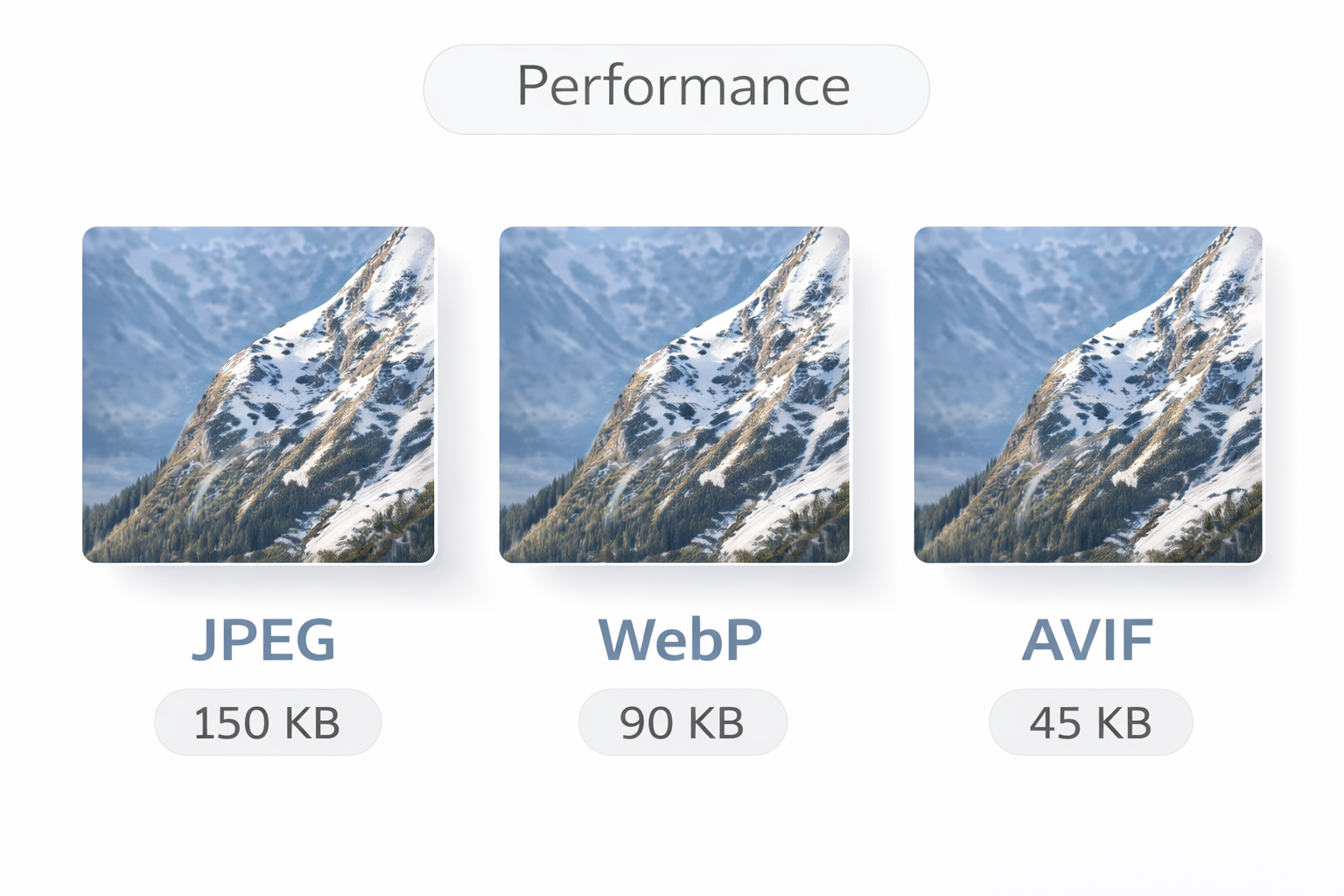
AVIF represents a newer generation of image compression focused on maximizing efficiency without sacrificing perceived quality. It can often achieve smaller file sizes than WebP at similar visual quality levels, especially for high-resolution images. That makes it attractive when bandwidth savings matter.
However, adoption remains gradual because encoding can be heavier and tooling support still varies across workflows.
Best suited for:
- performance-focused delivery
- bandwidth-sensitive platforms
- high-resolution digital imagery
Trade-offs:
- slower encoding process
- ecosystem and workflow support still evolving
Best Image Format for Animation
GIF remains widely recognized for simple animations due to its universal compatibility and ease of sharing. Its limitations — including restricted color depth and relatively large file sizes — mean it is not the most efficient option, but it persists because nearly every platform supports it without extra effort.
Modern formats such as animated WebP can be more efficient, but GIF often remains the compatibility-first choice.
Best Image Format for Printing and Archival Quality
For printing and long-term preservation, maintaining maximum image data becomes more important than minimizing file size. TIFF is commonly used in professional printing and archival workflows because it preserves image information with minimal or no compression loss, supporting accurate reproduction and detail retention.
High-quality PNG files can also be suitable when transparency or precise graphics are required.
JPEG vs PNG: The Practical Decision
JPEG and PNG are often compared because both formats are widely used but serve fundamentally different purposes. In practice, the choice usually depends on whether an image prioritizes compression efficiency or visual precision.
JPEG works best for photographs and complex images with smooth color transitions.Its compression reduces file size significantly, making it suitable for digital sharing and online publishing where efficiency matters.
PNG is designed for accuracy: it preserves sharp edges and exact colors and supports transparency, making it more suitable for graphics, screenshots, text overlays, and many design assets.
A simple rule of thumb is:
- choose JPEG when working with photos and realistic visuals;
- choose PNG when clarity, transparency, or precise details are more important than file size.
If you want a deeper technical comparison, including compression behavior, visual artifacts, and real-world examples, you can read our detailed guide on JPEG vs. PNG: Which Image Format Is Right for You?
WebP vs AVIF: Modern Image Formats Explained
As image-heavy platforms continue to grow, newer formats have been developed to reduce file sizes without noticeably affecting visual quality. WebP and AVIF reflect this shift toward more efficient image delivery.
WebP became a practical modern default because it supports lossy and lossless compression, transparency, and animation in one format. It integrates smoothly into existing pipelines and works especially well when you need faster loading and a consistent format for mixed image types.
AVIF focuses on even higher compression efficiency and can often produce smaller files than WebP while preserving fine details and smooth gradients. The main trade-off is workflow practicality: encoding can be slower, and adoption is still catching up. AVIF is most useful when maximum size reduction matters — for example, in bandwidth-sensitive environments or large image libraries.
In many modern setups, both formats coexist: WebP is used as a reliable baseline, while AVIF is introduced selectively where extra savings justify the added complexity.
SVG, GIF, TIFF, and Other Specialized Image Formats
SVG: Scalable Graphics for Modern Interfaces
SVG is a vector-based format that uses mathematical paths instead of pixels, allowing graphics to remain perfectly sharp at any size. This makes it ideal for logos, icons, and interface elements in responsive design. SVG is not suitable for photographs or highly detailed images.
GIF: A Legacy Format That Still Persists
GIF remains widely used for simple animations due to its universal compatibility and ease of sharing. Despite limited color depth and relatively large file sizes, it continues to persist, although modern formats like animated WebP are often more efficient.
TIFF: High-Fidelity Images for Print and Archival Work
TIFF is used in professional printing and archival workflows where preserving maximum image detail is more important than file size. It supports high-quality editing and accurate color reproduction but produces very large files.
Why Specialized Formats Still Matter
The continued presence of these formats highlights an important principle: image formats evolve by specialization. New formats improve efficiency in certain contexts, but older formats remain relevant when they solve specific problems better.
Understanding when a format is specialized helps avoid unnecessary conversions and preserves workflow efficiency.
Common Mistakes When Choosing Image Formats
Many image issues come from choosing an unsuitable format for the task.
Using PNG for photographs creates unnecessarily large files without visible quality benefits. Saving logos or text-heavy graphics as JPEG can introduce artifacts and blur sharp edges. Ignoring the final output often leads to mismatched quality or file size, and repeatedly re-saving lossy images can gradually reduce quality over time. Finally, choosing formats based on trends instead of practical needs can add complexity without real benefit.
Future of Image Formats After 2026
Image formats are evolving gradually toward higher efficiency and more automated delivery rather than sudden replacements. Modern formats continue to improve compression, while established formats remain deeply integrated into design tools and publishing workflows.
As tooling advances, format selection will increasingly be handled dynamically based on device capabilities and delivery context — making the “best format” less about a single file choice and more about using the right format in the right place.
Final Thoughts
Image formats continue to evolve, but no single format replaces all others. Each exists because it solves a specific problem — whether preserving detail, reducing file size, enabling scalability, or supporting professional output.
Understanding these differences makes choosing the right format straightforward: match the format to the image’s purpose and final destination, and the “best” option becomes obvious


