Do you know that 80% of people say a LinkedIn profile picture helps them understand a person better? This statistic highlights just how crucial that little square image is on your profile.
In this competitive job market, where everyone is struggling to score high-paying jobs, recruiters often judge job seekers based on their LinkedIn profile picture. LinkedIn is a platform that provides opportunities for everyone; it connects hiring managers, recruiters, and professionals from every field.
With an impactful and professional profile picture on LinkedIn, you can create lasting first impressions on the hiring team. Subsequently, it will have an immense impact on getting you more connections, growing your network, and creating amazing career opportunities.
What Should a LinkedIn Profile Picture Look Like?
Unless you are a professional model or an actor, it is not about looking your best; it is only about putting your best self forward. However, your LinkedIn profile picture must have the following aspects:
- Wear professional attire that you would normally prefer wearing to work.
- Use natural, soft lighting with a contrasting colored background to enhance your persona.
- Your face must cover 60% of the space.
- Make sure your eyes are open and visible and have a little smile on your face as your LinkedIn profile is your brand so it must look sympathetic, approachable, and friendly.
Recommended Dimensions and Picture Sizes for LinkedIn Profile
The recommended size for a LinkedIn profile picture is 400 x 400 pixels. This size ensures your photo is clear and sharp, maintaining its quality across various devices and screen sizes.
When it comes to file formats, you have two solid options: JPEG and PNG. Both formats work well, but each has its own advantages. JPEG files are typically smaller, which means they load faster. On the other hand, PNG files tend to maintain higher quality, especially for images with text or intricate details.
What Picture Do I Use for My LinkedIn Profile Picture?
When it comes to creating a stellar LinkedIn profile, your profile picture is one of the first things people notice. It’s your digital handshake, your visual introduction. So, how do you choose the perfect LinkedIn profile picture? Let’s dive into the options and see how each can shape your professional image.
1. Profession Photo Session
The simple solution for making your LinkedIn profile picture is to book a professional photographer for a one-hour photo session. This is a great way to get high-quality LinkedIn profile pictures for a decade.
2. Take a photo on your phone
Your smartphone, combined with some savvy online tools, can help you capture and edit your images like a pro.
- Step One: Take a Clear Photo
First things first, you need to take a clear photo. Ensure your phone’s lens is clean and the lighting is good. Natural light works wonders, so try to take your photo near a window or outside. Avoid harsh sunlight to prevent shadows and squinting. Use your phone’s built-in gridlines to center yourself and keep the shot straight.
- Step Two: Enhance Your Photo Online
Once you’ve got your photo, it’s time to enhance it. There are plenty of online tools that can help make your photo look more professional. By the way, we have written an article on how to take a passport photo at home. So you can use these steps to get a professional photo for your LinkedIn profile.
3. Face Swap Business Avatar
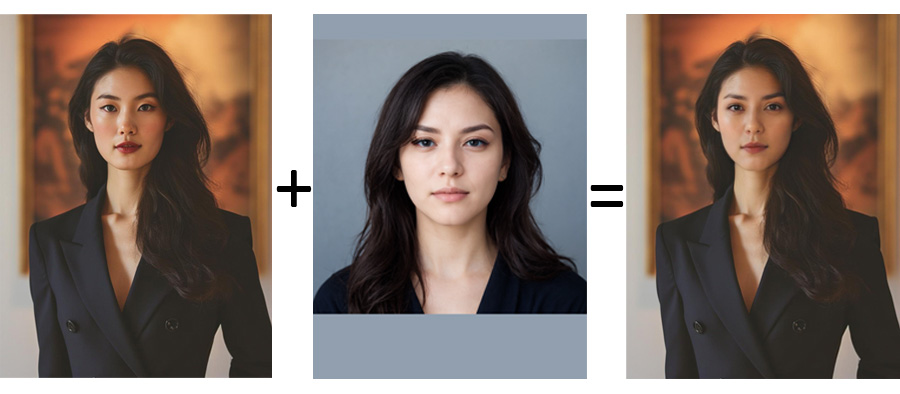
One of the most creative and quick ways to make your profile pictures attractive is using the face swap feature by reface.ai. With the help of this, you can seamlessly integrate your face into any of the pre-existing pictures.
Furthermore, this tool has a library filled with numerous business models. You can choose the one that perfectly aligns with your business look, and this tool will fit your face into it.
Go through the following steps to get your business avatar at home:
- Select a photo of a well-dressed business person from the large catalog who closely resembles you.
- Next, upload your photo.
- Merge both the photos and create your business photo.
- For clear and optimal results, use front-facing and high-resolution images.
Note: Hair color and face form remain unchanged, and your photo must not be obscured or turned away as it can affect the resultant image. In addition, remember similarities might not be exact.
How Can I Make My LinkedIn Profile Attractive?
With all the social media platforms, there are certain trends to follow, and you can decide which one suits you the best.
Profile Photo with a Colored Circle
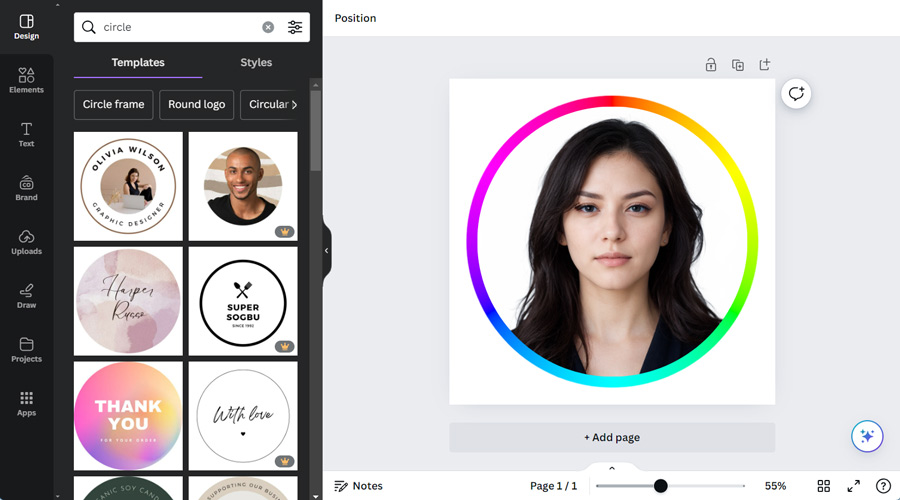
One of the most popular LinkedIn profile picture examples includes using a colored circle to enhance your picture and make it more attractive and appealing.
But make sure the color is aligned with your brand identity and must match the tone of your profile picture. Here is how you can add a colored circle to your profile picture:
- Open ‘Canva’ and create a new template with 800x800px.
- Choose ‘circle’ from the templates and add your picture in the center.
- From the left panel, go to elements and add a circle.
- You can choose a circle color that compliments your picture better.
or
- Find a round image of the color spectrum anywhere we have found on the Wikipedia Color Wheel article.
- Upload the color wheel and your photo to Canva.
- Drag the color spectrum onto the canvas.
- Add a round frame to the foreground (Elements -> Frames).
- Insert your photo into the frame previously removed background from your photo.
The Picture Without Background

Another way to make your profile photo attractive is to use an image with a white background. You can remove the background from the image by simply following the steps given below:
- Visit Remove Background by Image Upscaler, and upload the image from which you wish to remove the background. The image can be of any format such as JPG, JPEG, PNG, or WEBP.
- Once the image is uploaded, choose the background type you wish to see like black, white, or blurred.
- Click on ‘start processing’ when you are done, and the background will be removed within seconds.
LinkedIn Profile Picture in a Cartoon Style
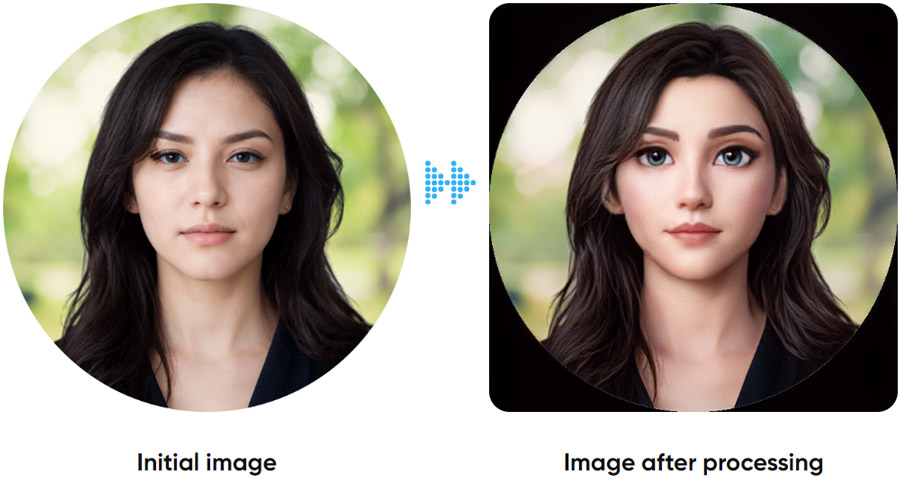
You can also make your profile picture look like a cartoon to make it more attractive and catchy. Choosing a cartoon-style profile picture on LinkedIn solely depends on which industry you are working in. For example, if you are a lawyer, this is not the best option for your profile picture. Some design agencies and IT companies prefer cartoon pictures as their LinkedIn profile photos.
With Image Upscaler’s Photo to Cartoon converter, you can seamlessly convert your pictures into a cartoon by following these simple steps:
- Upload your desired picture and ‘start processing.’
- It will only take 10-15 seconds, and your picture will be converted into a cartoon without even signing up.
- After completing, you can download your picture in high quality and upload it as your LinkedIn profile photo.
AI-generated background
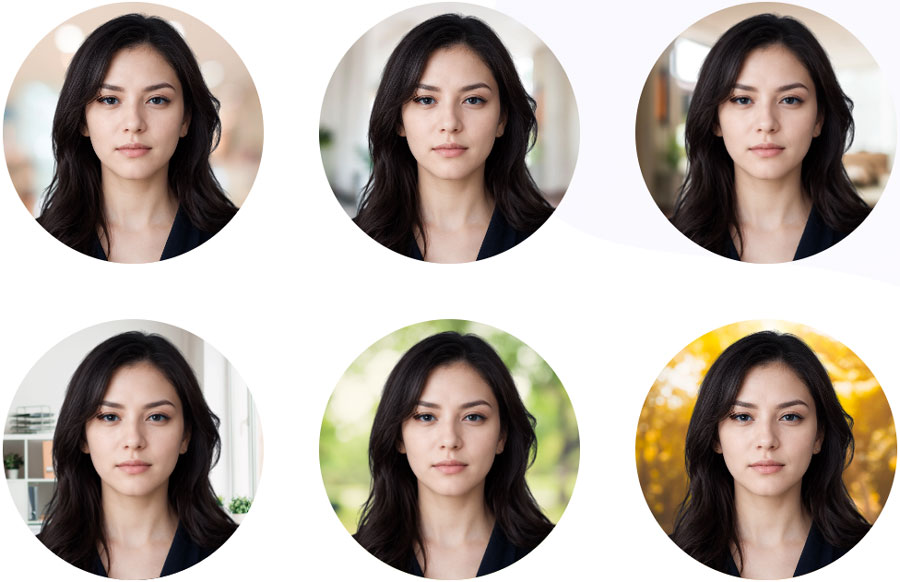
Since the advent of Artificial Intelligence, every industry has hugely benefited from it and leveraging AI to create LinkedIn profile pictures. In this case, you don’t need a professional photo. Simply take a selfie with your phone and upload it using the online tool. Profile Pic Maker is a freemium platform from where you can quickly make your photo more professional. Just upload an image and let AI change your background. This tool provides a variety of backgrounds and allows you to edit them.
How to Change LinkedIn Profile Picture
Changing a LinkedIn profile picture is straightforward. All you have to do is:
- Click on your LinkedIn profile picture and visit your profile.
- Next, click on your profile picture, and a small window will appear with your picture.
- You can see several options along with your picture, such as edit, delete, and frames.
- Choose your desired action – you can easily delete the existing picture and upload a new and different one.
What Does Your LinkedIn Photo Say About You?
Your professional LinkedIn profile picture helps in building your brand identity, reflects your brand, attracts more people, and makes them realize that you pay attention to every detail.
According to the statistics, people with an effective LinkedIn profile picture receive 21 times more profile views and 9 times more connection requests, which shows how imperative it is for you to get a LinkedIn profile picture that actually benefits you in getting more connection requests and more opportunities.
Frequently Asked Questions
Should I Get a Professional Photo for LinkedIn?
Yes, absolutely. It is necessary to get a professional photo for LinkedIn as it is your way to create a powerful first impression and grow your network.
How Do I Choose a LinkedIn Profile Picture?
Choose a profile picture with the following characteristics:
- High-quality image: Ensure the photo is clear and well-lit.
- Simple and suitable background: Opt for a clean, uncluttered background.
- Appropriate dress: Wear attire that you would prefer wearing to your workplace; this shows your professionalism and attention to detail.
- A little smile and eye contact with the camera: This adds approachability and warmth to your profile.
Should I Smile in a LinkedIn Headshot?
Yes, having a genuine smile in your LinkedIn profile picture is imperative because it shows your friendly nature and conveys a welcoming message for all.
What Should I Put as My Background Picture on LinkedIn?
You can use several ideas to choose as your LinkedIn profile picture background. This can include your workplace, neutral background, or white background.